.svg)
Shopify Just Removed the Biggest Barrier to A/B Testing
For years, proper A/B testing on Shopify required one of three things:
- Expensive third-party tools
- Custom engineering infrastructure
- Or taking a risk and deploying changes blindly
Most brands chose the last option.
Now, Shopify has introduced Rollouts a native feature inside the new Markets experience that changes how storefront updates can be deployed and tested.
No apps. No scripts. No duplicated themes.
Just controlled experimentation, built into admin.
What Is Shopify Rollouts?
Shopify Rollouts is a native feature that allows merchants to test, schedule and gradually release storefront changes to a percentage of users, while measuring performance before full deployment. Its a centralised system for managing, scheduling and testing changes to your online store before publishing them
It enables:
- Percentage-based traffic exposure (e.g. 10%, 50%)
- Scheduled launches and end dates
- Testing changes directly on your live theme
- Performance comparison before committing changes
- Permanent application of winning variations
In short: it brings product-grade experimentation into Shopify.
Why Shopify Rollouts Matters (Beyond the Feature)
This isn’t just about A/B testing.
It’s about Shopify shifting towards product-led operations where merchants operate more like product teams than traditional retailers.
These capabilities mirror how companies like Amazon and Netflix ship features:
- Gradual rollouts
- Controlled exposure
- Data-led validation
- Continuous iteration
That level of control is now native to Shopify.
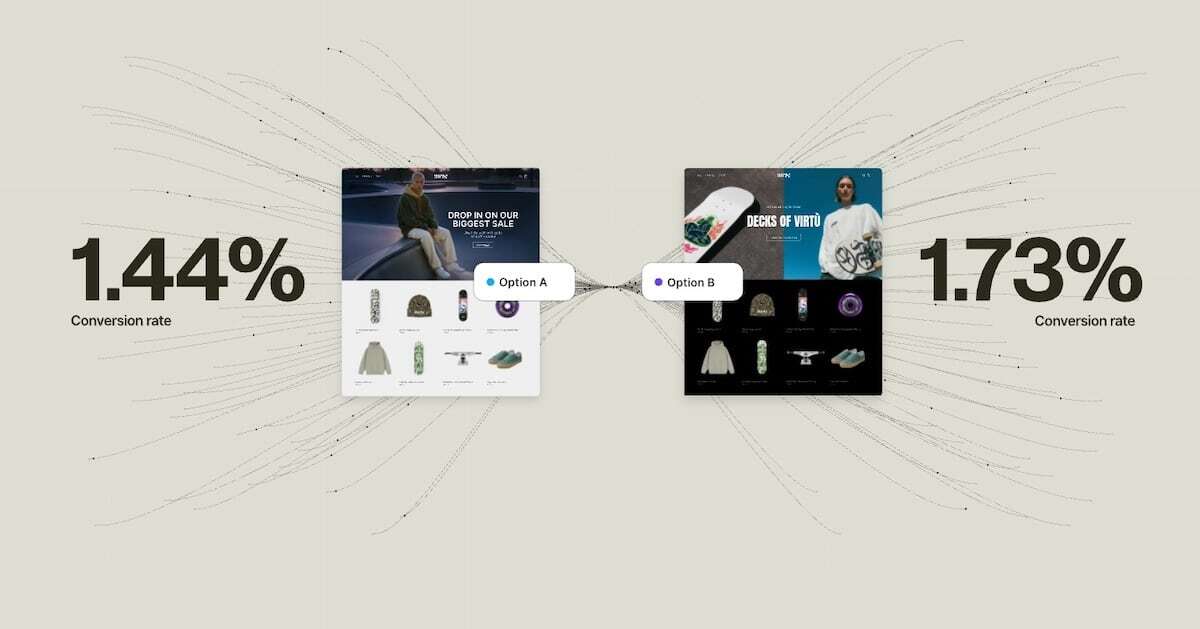
The Old Way vs The New Way of Shopify Experimentation
Before Rollouts
- Duplicate themes to test changes
- Full-site deployments with no safety net
- High reliance on third-party tools
- Decisions based on opinion
After Rollouts
- Test directly on your live storefront
- Release changes to controlled traffic segments
- Schedule campaigns and launches in advance
- Validate performance before scaling
The risk drops. The speed increases.
The Problem: Most Brands Still Won’t Do This Properly
Let’s be direct.
The biggest barrier to experimentation was never tooling.
It was discipline.
Rollouts removes the technical excuse but it doesn’t fix:
- Lack of clear hypotheses
- Poor tracking and measurement
- Stakeholder bias overriding data
- No structured testing roadmap
This is why most brands will “have Rollouts” but won’t actually benefit from it.
What High-Performing Shopify Brands Will Do Instead
The brands that win won’t just enable Rollouts. They’ll build a repeatable experimentation system.
1. Hypothesis-Driven Testing
Not: “Let’s redesign the homepage.”
But: “Will simplifying above-the-fold content increase conversion rate for new users?”
Clear input → measurable output.
2. Controlled Rollouts
Instead of pushing changes to 100% of users:
- Start with 10–30% traffic
- Compare against baseline
- Increase exposure only when validated
This reduces risk and improves decision confidence.
3. Data-Led Decision Making
Winning brands will:
- Kill losing variants quickly
- Scale winning variants decisively
- Document learnings
- Build a testing backlog
Over time, this compounds into sustained conversion growth.
Key Features of Shopify Rollouts
- Percentage-based deployment – control how many users see changes
- Scheduled releases – launch campaigns at exact times
- Live theme testing – no duplicate themes required
- Market-specific targeting – test changes per region
- Performance insights – measure impact before committing
Limitations (Early Access Reality Check)
Rollouts is powerful but still evolving.
Current constraints include:
- Only available with new Shopify Markets
- Limited to published themes
- No support for Liquid templates, theme settings, or app embeds
- Translation limitations for rollout-specific changes
- Not compatible with vintage themes
This is foundational infrastructure not a finished product.
WIRO Insight: This Is a Competitive Window
Most brands are still operating like this:
- Shipping changes based on instinct
- Measuring inconsistently
- Learning slowly
Rollouts introduces a different model:
Test → validate → scale → repeat
The brands that adopt this early will:
- Reduce deployment risk
- Improve conversion rates incrementally
- Outlearn competitors over time
Because in modern eCommerce, learning velocity is a growth lever.
How to Use Shopify Rollouts (Step-by-Step)
- Go to Shopify Admin → Markets → Rollouts
- Create a rollout
- Set traffic percentage (start with 20–30%)
- Add theme changes
- Schedule or launch immediately
- Monitor performance
- Apply changes permanently if successful
What Should You Test First?
Start with high-impact areas:
- Homepage structure and messaging
- Product page layout and content hierarchy
- Pricing and promotional messaging
- Cart and checkout UX signals
Focus on changes that directly impact conversion rate and revenue per visitor.
The Bigger Shift: Shopify Is Becoming a Product Platform
Rollouts is part of a broader shift.
Shopify is moving from:
Store builder → Operating system for commerce
And that includes:
- Experimentation
- Deployment control
- Data-led optimisation
This is how modern eCommerce brands scale.
Final Thought
Shopify has removed the hardest part.
You no longer need tools, budget, or engineering support to run experiments.
Now it comes down to execution.
Most brands won’t build the discipline required.
The ones that do will quietly outperform not through big redesigns, but through consistent, validated improvements over time.

.png)

.png)